Monitor AI costs
For operators who want to track what the calls to their AI provider cost over the past week.
Prerequisites
- At least one conversation or agent has already called your AI provider.
- You use a billed server. Local models do not appear in the costs.
- The developer mode is on (Settings, section Developer): Observability is one of the technical screens, shown in the sidebar only with that mode.
Steps
-
In the sidebar, click Observability, then the LLM Costs tab.
-
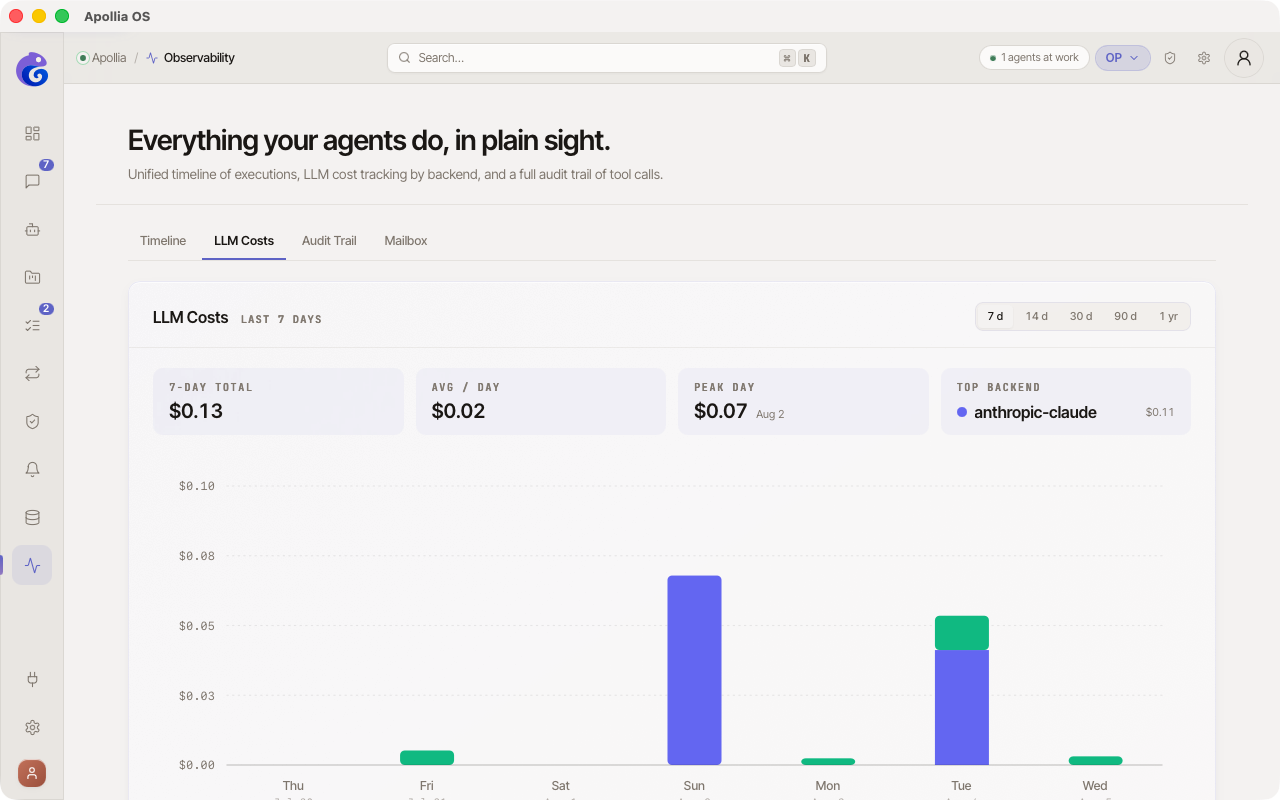
At the top right of the card, a period selector lets you switch between 7 d / 14 d / 30 d / 90 d / 1 yr. Every indicator, the chart and the legend recompute instantly over the new window. The density of the horizontal axis adapts automatically (labels thinned out beyond 14 days).
-
At the top, four key indicators (KPI) summarise the selected window:
- 7-day total - the label is fixed and says seven days whatever period you select, so read it as the sum over the window rather than over a week.
- Avg / day - total divided by the number of days in the window.
- Peak day - amount + date of the day that consumed the most.
- Top backend - name of the backend that weighs the most, with its cumulative total.
-
In the centre, a stacked bar chart shows the selected period. One bar per day, each bar split into coloured segments by backend. The vertical axis is in dollars with rounded ticks; the horizontal axis shows the date (day of the week + short date for short windows, date only for 30 d and above). A backend only shows up for the calls Apollia was able to price, which is not every call it made.
-
Hover a column: the other days fade slightly and the day total appears above the bar. A tooltip also appears on each segment with the backend name and its exact cost.
-
Below the chart, the legend lists every active backend as pills showing the cumulative total per backend over the window. Handy to compare each provider's share at a glance.
Verification
The figures at the bottom match your intuition about consumption. The data refreshes automatically about once a minute.
Note - hybrid routing: if you use hybrid routing (
[llm.routing.hybrid]), the steps escalated to the frontier model appear under the frontier backend in the chart and in the legend. Watch that backend to keep your real consumption in check against the configuredcost_ceiling_usdceiling.
If it does not work
- Observability is not in the sidebar: the developer mode is off. Turn it on in Settings, section Developer.
- The chart is empty: no priced call was recorded over the window, which has two causes. Your backend may be a fully local model, which costs nothing. Or the model you call carries no price in Apollia: the client of the OpenAI-compatible servers, which serves every server you declare, a gateway you operate among them, prices only
gpt-4o-mini,gpt-4oandgpt-3.5-turbo. Any other identifier is recorded with no cost at all. - The costs look too high: open Agents, then Logs in the menu of the busiest agent, and look at the longest tasks - a bulky injected context inflates input tokens fast.
- Costs went up after enabling hybrid routing: the frontier is being called more often than expected. Lower
cost_ceiling_usdin[llm.routing.hybrid]to limit escalation, or disable hybrid routing temporarily. See Connect a remote model.
Technical reference: Apollia reference