Wire your own MCP server
For any operator or builder who wants to connect an MCP server that is not in the catalogue, locally (stdio) or remotely (HTTP, SSE).
Prerequisites
- Apollia running.
- An MCP server that conforms to the spec, over stdio transport (local subprocess), streamable-http or sse.
- Access to the server: local command + arguments, or remote URL + authentication headers.
Steps
-
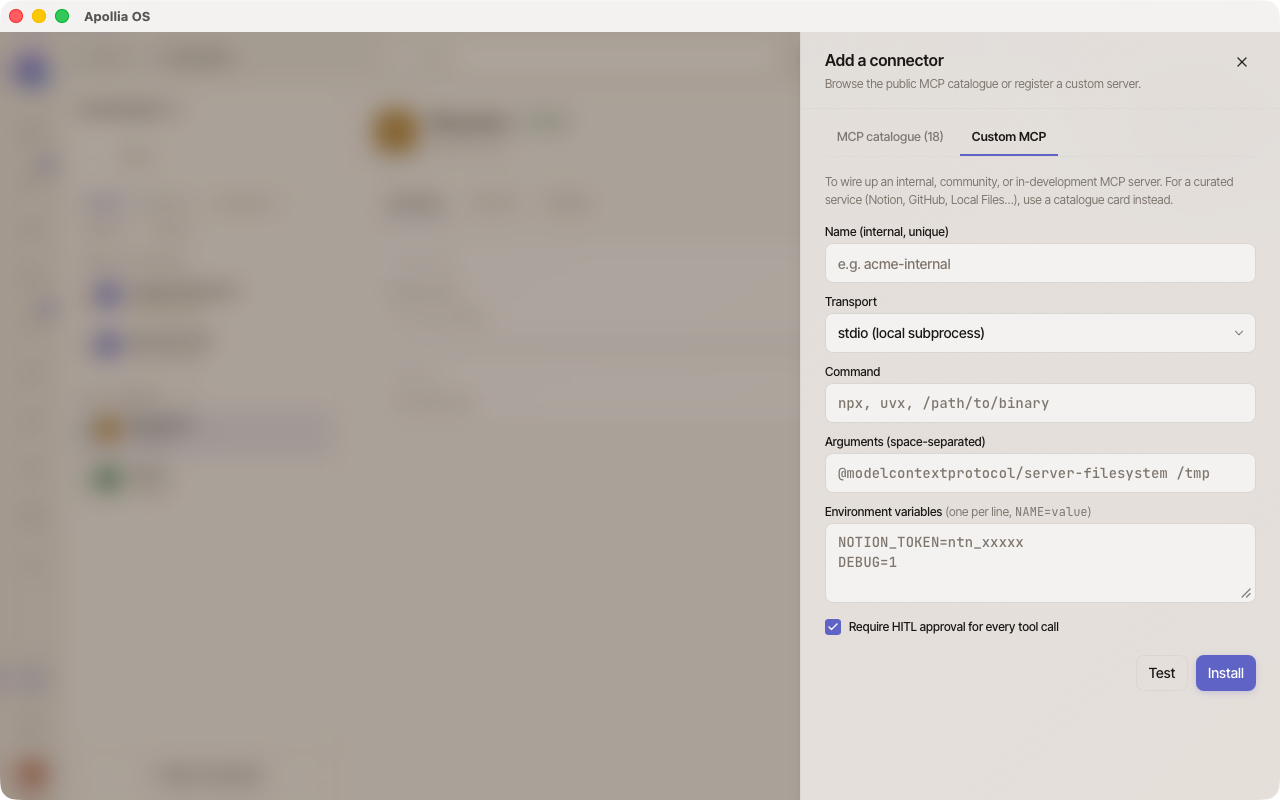
In Connections, click Add a connection at the top of the page. A sheet opens on the Catalogue tab; switch to the Custom connection tab.
-
Fill in the form. Without developer mode it asks for a name, an address and optional headers, which is the remote case below. With developer mode on, a Transport choice appears and opens the two other cases.
-
Click Test. Apollia attempts a real connection and counts the tools declared by the server.
-
If the test passes, click Install. The server appears in the list of connections.
stdio case (local command)
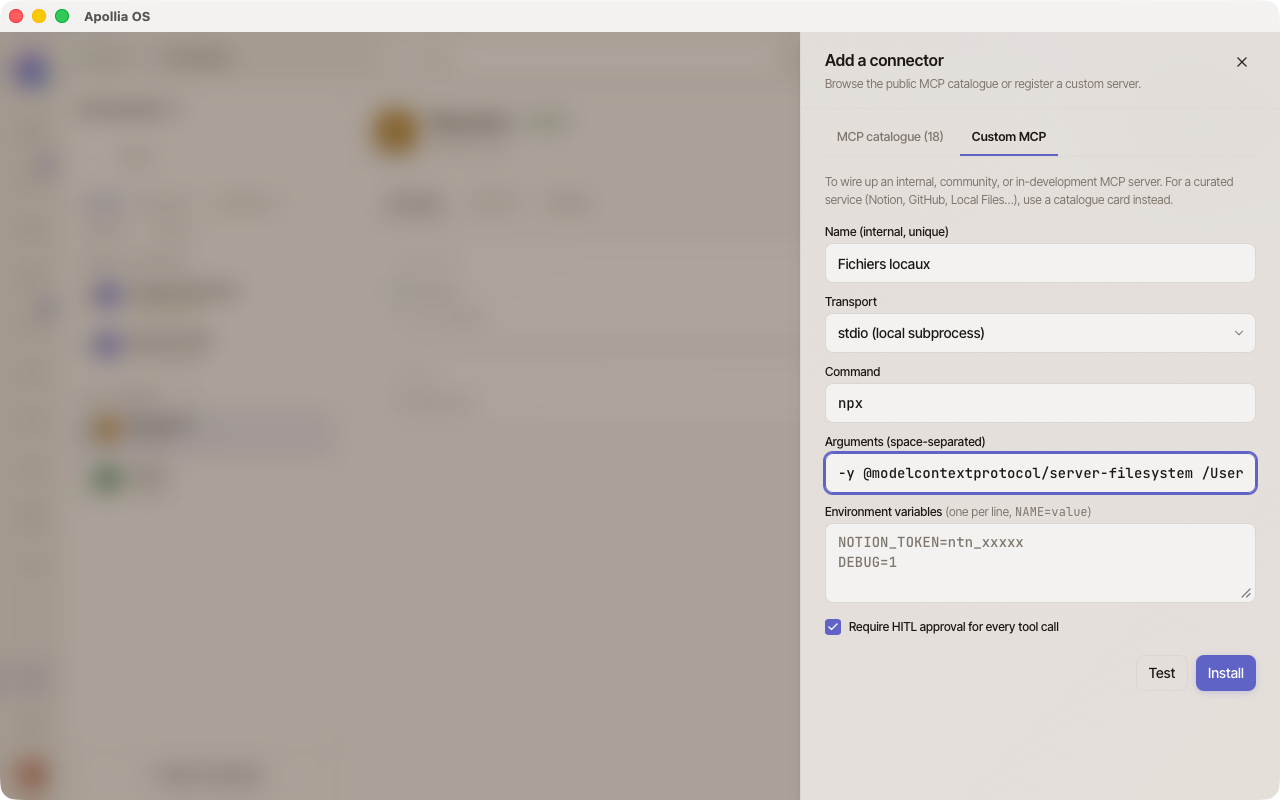
- Name: unique identifier. The field never refuses what you type, it rewrites it: lowercased, and every run of characters outside
a-z,0-9,_and-replaced by a single hyphen, leading and trailing hyphens dropped. Underscores are kept. A name left with nothing becomescustom-mcp. SoMy Server!is installed asmy-server, silently; check the name the list shows afterwards. - Transport:
stdio (local subprocess), offered with developer mode on. - Command: executable to launch (for example
npx,uvx, or an absolute path). - Arguments: separated by spaces (for example
-y @modelcontextprotocol/server-filesystem ~/Documents). - Environment variables (optional): one per line, in the
NAME=valueformat.
streamable-http case (remote server)
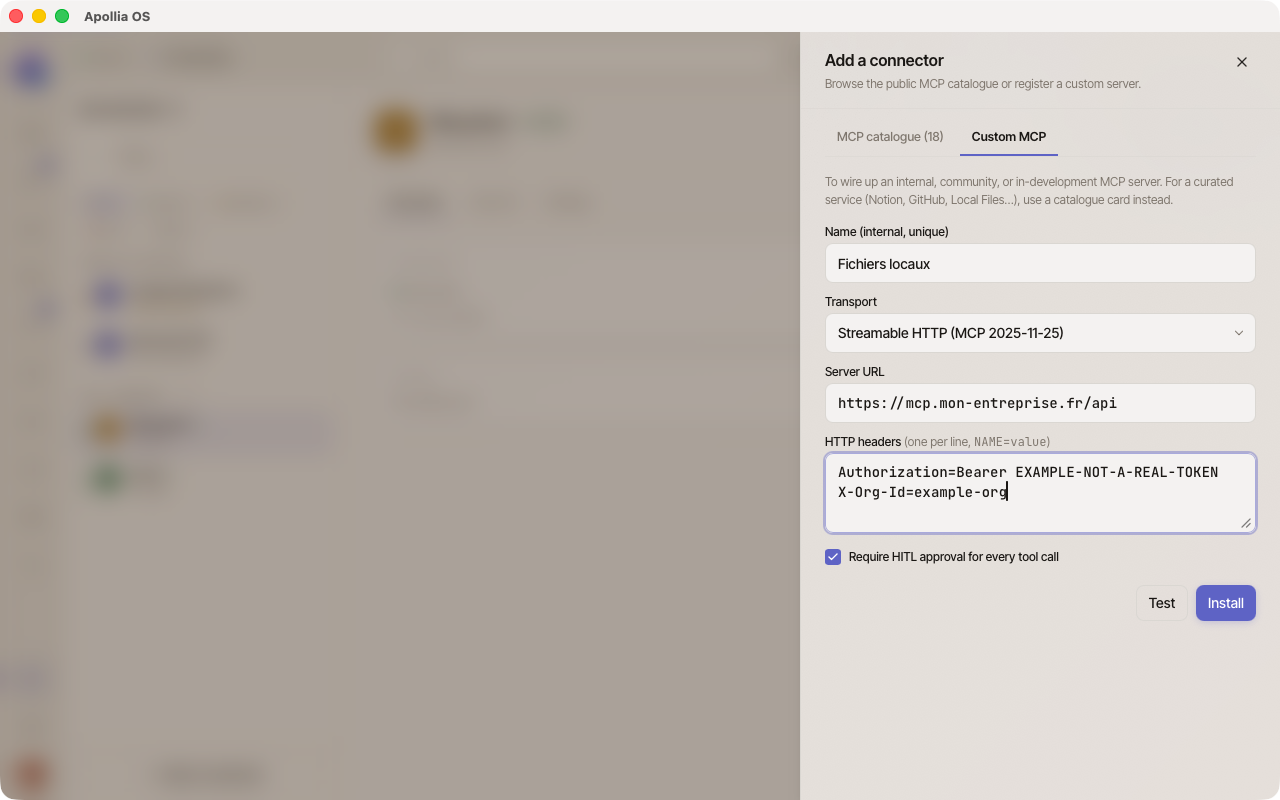
- Name: unique identifier.
- Transport:
Streamable HTTP. It is the only one without developer mode, and the choice is then not shown. - Address: HTTP endpoint of the server (
https://...). - HTTP headers (optional): one per line, in the
NAME=valueformat. Example:Authorization=Bearer sk-...orX-API-Key=....
SSE case
Identical to the streamable-http case but with Transport: SSE, offered with developer mode on. Used for servers that keep a persistent SSE connection open.
OAuth 2.1, from the catalogue only
When a server of the catalogue advertises an OAuth endpoint that conforms to the MCP authorization spec (RFC 9728 Protected Resource Metadata + RFC 8414 Authorization Server Metadata), the dialog that adds it handles the sign-in on its own:
- Metadata discovery (PRM, then OIDC fallback).
- Client identification through the Apollia CIMD, or Dynamic Client Registration (RFC 7591) as a fallback.
- Code exchange with PKCE S256 and Resource Indicators (RFC 8707).
- Token storage in the local keychain and proactive refresh with singleflight.
The custom form does not run this flow. When its Test meets a server that requires OAuth, it answers "This server requires OAuth authentication. Install it from the catalogue rather than via the custom form." A server that accepts a static token is wired here by putting the token in HTTP headers.
Local mDNS discovery
Apollia can scan your local network for MCP servers that advertise themselves through mDNS (service type _apollia-mcp._tcp.local.). No option of the interface runs that scan: it is a command, apollia-os mcp list --discover, which lists the configured servers and adds the ones it found on the network.
Verification
- The server is in the list of connections with an active badge.
- The Tools tab of its page lists the tools the server advertises.
- A test reports the server as working or reachable, with its tool count (see Test an MCP connection). No latency is measured on the MCP path.
Security, what Apollia applies by default
- Presentation: a manually added server is shown as a Custom connection. It appears in the list without the logo and the description that the entries of Apollia's selection carry.
- Approval: the server carries no approval setting of its own. Each tool it publishes is decided on its action family: what the server declares in the tool's annotations sorts a read from a write, and a tool it does not describe is treated as sensitive. An agent that calls a sensitive tool asks first, and you answer once, always for this agent, or refuse.
- Roots: Apollia advertises the capability during the handshake, and answers no
roots/listrequest. No directory is declared, so roots bounds nothing today. What bounds a stdio server is the command and the arguments you gave it, which is why the filesystem path you pass in Arguments is the real perimeter. - Sampling and elicitation: not implemented. Apollia does not advertise these two capabilities during the handshake, so a server that supports them will not try to call back through them.
Deferred loading mode
By default, Apollia loads the tools of an MCP server in deferred mode: they are not injected into the context at startup. The agent uses tool_search to fetch them on demand. This is the right setting for most servers.
If your server exposes few tools (fewer than ten) or if your agents use them systematically on every run, you can switch to eager mode in your configuration:
[mcp]
tool_loading = "eager"
In eager mode, every tool of the server is loaded into the context on every call. This simplifies the agent behaviour but increases token consumption.
The tool_search_limit parameter bounds the number of tools returned by tool_search in deferred mode, and below that same bound the index is declared to the agent up front rather than searched. Default value: 20. Valid range: 1 to 500. A two-server install is usually under it, which is why deferred behaves much like eager at that size.
[mcp]
tool_loading = "deferred"
tool_search_limit = 20
If it does not work
- "Command not found" on stdio: your binary is not in Apollia's PATH. Give the absolute path or adjust your PATH before launching Apollia.
- "Connection refused" on HTTP or SSE: wrong URL or port, or a firewall blocking outbound traffic. Check that the server is reachable from your machine with
curl <url>. - OAuth loop: your server advertises its metadata endpoint incorrectly, or a scope was refused. Apollia rejects non-conformant authorization servers fail-fast (PKCE S256 is mandatory). Check the server-side logs.
- "No tool detected": the handshake succeeds but the server does not declare the
toolscapability in itsInitializeResult. Check the server-side implementation.
Getting your server to show up in the UI catalogue
Your internal server appears in the list once connected, but without the logo and the description that the entries of Apollia's selection carry. Customizing the catalogue is not possible: the override file is read by nothing.
Technical reference: Apollia reference , full protocol schema, capabilities, transports, security.